












































































































































































































































































































































































































































































Enumeration of the Certificate Authority
We can see custom and default certificates on a domain controller via the certsrv Console (default starting below Directory Email Replication).
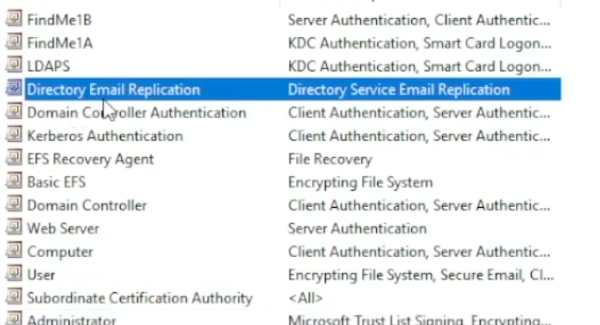
An example of a custom one that has actual real-world use is the custom LDAPS cert, this enables LDAPS on the DC and is a good use case for why certificates are needed in an environment.
The Certificate Templates Console
Templates are stored in the Certificate Templates Console.
AD Module
Get-ADObject -Filter * -SearchBase 'CN=Certification Authorities,CN=Public Key Services,CN=Services,CN=Configuration,DC=security,DC=local'
Get-ADObject -LDAPFilter '(objectclass=certificationAuthority)' -SearchBase 'CN=Configuration,DC=security,DC=local' | fl *
Templates
Blueprints for Certificates

Certificate Authority (CA)
This is the authority that owns the template. In a real-world environment, you'll see multiple certificate authorities.

DNS Name is the hostname of the server, while the CA name is the name of the certificate authority. These are shown primarily under the 'Certificate Authorities' entry on the output.

Enrolee Supplies Subject
The user enrolling is able to request a certificate from the template. you get to supply the SAN (or user).

Certify (Windows)
https://github.com/GhostPack/Certify
Certify.exe cas
Invoke-Certify cas
Certipy (Linux)
certipy find -u <user> -p <password> -dc-ip 10.10.10.100 -stdout